
Your course may mention that you need to read an article on something called Newsela. Newsela is a site that has many articles that can add information to the coursework at ORCA. You will most likely use this resource many times!
How Do I Get to Newsela?
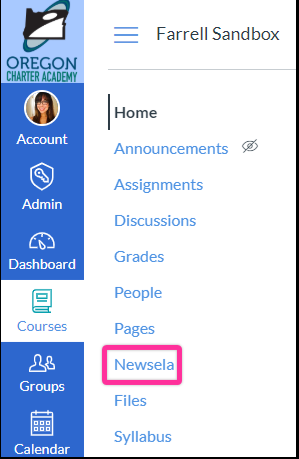
When you have an assignment that mentions to read an article "assigned" to you in Newsela, you will need to remember the name of the article, and make your way to Newsela! You can locate Newsela through the Canvas course navigation menu on the left side of your course page. By doing so, you'll be taken to the Newsela site.
If this is your first time accessing Newsela, you should see a message saying you can sign in to join your course, and the name of that courses teacher. Go ahead and select "It's my first time here."

What Should I Have Access to in Newsela?
Once you are in your Newsela account you can see all of the articles assigned to you by clicking "Assignments" and checking under "Your Assignments." All articles are assigned by your course's teacher, so all of your "assigned reading" will already be there! If not reach out to that courses teacher. Most recent work you are looking for should be under "Last 7 Days," older articles will be below that under "Older Assignments." Click on the article that has been assigned in canvas to view it, happy reading!

If you're still confused on using Newsela, don't hesitate to reach out to our support team! Take a look at the article below to see how you can reach us.
Comments
0 comments
Article is closed for comments.